
Kingdom Hearts: Birth By Sleep Less Groggy After Data Install

By Jenni . January 19, 2010 . 10:40am

Kingdom Hearts: Birth By Sleep Less Groggy After Data Install If you’ve started playing Kingdom Hearts: Birth By Sleep, you’ve already encountered the unavoidable annoyance. I’m talking about the frequent, and often overbearing, loading times. I could barely bring myself to wait for the first save point before returning to the home screen, plugging my PSP in, and heading straight for the data install option.


Thankfully, the data install process is relatively painless. Tedious, but painless. It could take a pretty long time for some users, perhaps a half hour, but it will be worth it. My PSP was fully charged and plugged in and I went with the largest installation, 600mb, and it took about 10-15 minutes.


First, you need to make sure your PSP is charged. Anyone who’s done the data install option before, say on Dissidia: Final Fantasy, will recall that your PSP will need to have over 50% battery power for the game to allow you to perform a data install.


There’s a good chance it’ll already be charged though. Kingdom Hearts: Birth By Sleep requires firmware 6.20, so if you’re the kind of person who only updates when its absolutely necessary (like me), your system will probably be all ready for the process.


Now, when you start a notification will pop up. All it’s saying is that if you change your system’s language after performing a data install, you’ll have to redo the process. So don’t worry that you’re doing something wrong when it comes up.


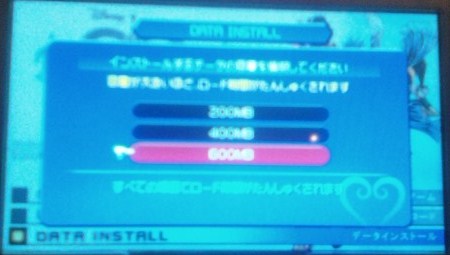
There will be three data install options to choose from, 200mb, 400mb and 600mb. I recommend the 600mb installation option if you have enough memory to do so. The loading times drastically decrease, and the game just seems to even flow better with it. The 200mb option didn’t seem to make much of a difference, as I tried that first in an attempt to conserve space.


After you perform the data install, you’ll need to turn the data install option on in the options menu. Just open the menu in game, choose the configuration section (the second to last menu option, in case you can’t read Japanese) and then go to the data install option in the next menu that shows up (again, second to last option) and set it to on.


I was a little surprised that Birth By Sleep really needed the data install. Typically, PSP loading times don’t bother me too much, and Kingdom Hearts: Birth By Sleep was the first time I actually caved and did the installation.


I was also disappointed at how long it it took to get to a point where I could turn on the option to use the Data Install feature after the first save point. I had to wait until Terra reached Sleeping Beauty’s world to access the options menu.

Read more stories about & & & on Siliconera.


  • http://terracannon876.livejournal.com Laura

    I've always found PSP times to be notoriously horrible. In Tales of Vs., the battles took 30sec to a minute to load … between each fight. And this, for a pure fighting game, was kind of detrimental.

    The first time I'd come upon the feature was in Hexyz Force (and not long after, in P3P), and I was in absolute awe of how smoothly the game run compared to previous games I'd played. Aside from the fast loading times, it also gets rid of most of the annoying whiirrr whirrrr sounds of the UMD being read. I practically worshipped whoever came up with that idea right then and there =_=

    Odd that the BbS Data Install is from the options menu though. The other games all had it at the start up menu, before you choose New Game or Load Game.

  • malek86

    Another example would be GT PSP, which improves a lot when you install data (a whole 1 gig), and especially, gets rid of the UMD noise. Man, it gets annoying after two second. Hearing the whirr sound so often (like when browsing in the garage)… just sucks. Installation is really recommended.

    Hexyz Force is kind of an exception by the way. Even with the install feature, most RPGs on the PSP are still slower. And this is only 82 megs. I guess Sting can work some miracles.

  • Yuan

    That's because Sting is one of the most experienced PSP developer (they also did a lot of port from other publisher to PSP).
    And ToVS is Matrix's first game on PSP…

  • http://terracannon876.livejournal.com Laura

    Hehe, yeah, I never tried HF without the Data Install. Can't tell how good something is until you've seen the bad? =P

  • Chow

    Wait, you can't install the game directly from the main menu, and have to access it at the first opportunity of the options menu? Or you just wanted to save so you could go to the main menu without losing X amount of time already spent on the game?

  • Chow

    I remember trying out the Monster Hunter Freedom Unite demo (whatever the most recent one is in North America), and being blown away at how fast you could relocate to a new map. Of course, this was because I was used to and had only played the first MHF game. Installs rock.

  • malek86

    I thought they only ported Riviera and Yggdra Union?

  • TokyoGuy

    A few comments here;

    1. If not mistaken, after you install the game data, the system file is automatically updated and the game is set to “Install” by default. Jenni I am not quite sure why you had to go into the configuration menu to change it but that didn't happen with my copy.

    2. Is 600MB really a lot of space? In this day and age flash memory is quite cheap. I got a 16GB Memory Stick for under 6000yen, and likewise a 16GB Memory Stick Micro for my PSPGo for around 7000yen. It's basically the price of a game, and then you can use it for tons of stuff. As a rule, I will always buy the download version of a game instead of the disc version now, not because of the PSPGo issue, but because with the game saved to flash, the loading times in general are drastically reduced and the battery life is increased as the PSP doesn't need to spin the disc constantly. Then again if you don't buy games often and/or don't have the money to drop on flash memory, it would be more of an issue.

    3. I can certainly agree with you with respect to the loading issue as a whole. It is absolutely atrocious. I remember asking myself why it was the other KH games loaded so quickly, and yet this one is such a disaster. Even with the 600MB file installed, way too much is spun off the disc and thus EVERY single screen has loading. Why couldn't Square have given the option for a full install, with only the cut scenes or whatnot kept on the disc. It's just plain lazy, and totally destroys the enjoyment of the game.

    4. The game also gives the option of a 16-Bit color mode and a 32-Bit color mode, though I notice absolutely no difference whatsoever. As I'm using a PSP-3000, maybe this is an issue for the 1000-series (and 2000?) which had lower quality images.

  • Yuan

    Yep. Some of them I recalled is Utawarerumono P and To Heart 2 P.

  • Aoshi00

    I just rec'd my copy tonight (yea, shiny cover). My 4Gb memory stick was constantly full before and I got a 8Gb recently (guess I could've gone 16..), so just in time for this install.

    Yeah. I always do full installs for my 360 games and for PS3 games (like SF IV, cut load time down from maybe over 10 sec to 2 sec btwn matches) if such option is available, I welcome mandatory install since I got a huge HDD. For some games the diff. in loading time is night and day, not to mention no spinning of disc in 360's case. You know how they would recycle the hints for the game while loading, but w/ install it's too quick you can't even read it.

    I hate they require your PSP to be over half charged too even when it's plugged into an outlet. I update firmware ASAP whenever it asks me and sometimes the battery's low and I have to wait for it to charge a while before the d/l starts.. I just did the install for Queen's Blade and it took a while too, at least 20 mins to half hr? I just let it run…

  • Yuan

    When I install QB, it just took about 5-10 minutes. Not really long, but The Memory Stick I use is the 1 GB which I got from Ratchet bundle.

  • Aoshi00

    I installed QB on my almost full 4Gb, and later transferred to the 8Gb via my computer. I don't remember how long exactly, maybe it was ~15 mins . The %bar seemed slow to fill up and I just kind of let it run for a while. But it did seem quite long, since I'm used to installing 360 games (~7Gb) for about 10mins or so. But yeah, I pretty much do full install for anything and everything for smoother sailing.

  • TokyoGuy

    Well to be fair, if the AC is cut and the console didn't have enough battery life to finish the install, the machine might not work (i.e. the OS wouldn't load) and then Sony would have to listen to complaints from people about that.

  • Aoshi00

    Yeah, I'm pretty sure that's the reason so power wouldn't be cut in the middle of an install, just thought it's a slight convenience to wait for it to charge even though AC is plugged in.

  • Tokyo Guy

    Well to be fair, if the AC is cut and the console didn't have enough battery life to finish the install, the machine might not work (i.e. the OS wouldn't load) and then Sony would have to listen to complaints from people about that.

  • Aoshi00

    Yeah, I'm pretty sure that's the reason so power wouldn't be cut in the middle of an install, just thought it's a slight inconvenience to wait for it to charge even though AC is plugged in.

Video game stories from other sites on the web. These links leave Siliconera.

Popular