


 By
By 
Since someone asked how Famitsa DS plays over Nintendo Wi-Fi, I gave it a whirl. There are two options for online play, picking a buddy from the friends list and challenging a random gamer. Before a game begins you get to select how many innings you want play, three for a short match or a full nine.
As you play Famista DS your team levels up and you get to customize your deck of players (more on that later). You can see the level of your opponent and the first person I was up against was above 40. He relied something the computer rarely takes advantage of, bunting by pressing the X button. In Famista DS bunting is a gambit. Since all the fielders move in tandem you can be in trouble if you start running towards the outfield to catch a far hit. However, it’s easy to run forward, scoop the bunted ball from the ground and throw it to first base. The next inning it seemed like my opponent revised his strategy. He missed his bunts on purpose. After the ruse he would take a real swing with the next pitch. I guess his thinking was I would try to run forward to grab the ball from the ground, but since the ball is far away my fielders would be out of position.
In a different game my opponent was keen on stealing bases by holding down the shoulder buttons to make your runners manually sprint. Another opponent was really good at catching fly balls, something that other players seem to have a hard time with since the camera follows the ball when it is in the air. Not every match is ripe with creative strategies or great players, but online play makes Famista DS feel fresh compared to the psychic catching when you play against the computer. The only issue about Famista DS’s online play is it doesn’t feel like it has balanced. It looks like when you pick random play you get the first available player regardless of their level.
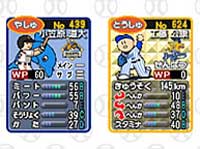 Win or lose you earn FP at the end of a match. These points are spent at the Famista capsule machines to unlock player cards and other bonuses. You can get a capsule for as low as 400 FP, but buying them in bulk in a better option since you get a slight discount. If you get a player card you can place him on your team by using the deck builder. Up to five decks can be saved, which allows you to have five teams ready for online play. Building a custom team is where importers may run into trouble with Famista DS since all of the data on the cards are in Japanese.